This is my write-up for the TryHackMe room on Client-Server Basics ↗. Written in 2026, I hope this write-up helps others learn and practice cybersecurity.
Task 1: Introduction#
In the past, computers operated completely independently, but networks like ARPANET and CYCLADES paved the way for the modern internet by interconnecting systems to share resources. Just like people specializing in society, computer systems specialize to offer services. This section sets the foundation for understanding the Client-Server model and core networking concepts like DNS, clients, servers, ports, protocols, and networks.
Let’s go!
No answer needed
Task 2: Pizza Delivery#
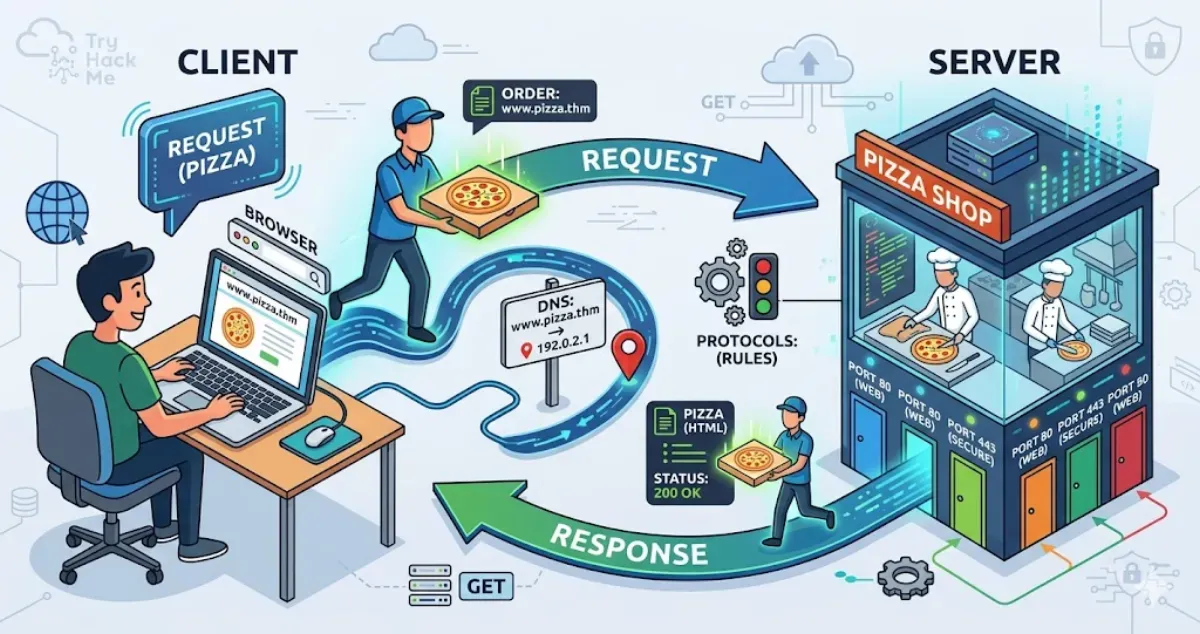
The Client-Server model is much like ordering takeaway pizza. The client (like a customer’s browser) initiates a request. The server (like the pizza shop) processes it and sends a response. A protocol dictates the rules of this communication, ensuring both sides speak the same language and understand the commands. A port is used to identify a specific service running on that server (similar to separate doors for delivery vs. dining in). Finally, DNS (Domain Name Service) translates a human-readable name into an IP (Internet Protocol) address, acting like a GPS to locate the exact destination of the server.
What do we use to identify a specific service on a server?
port
What do we call the address of a server?
Internet Protocol address
Task 3: Web Communication in Practice#
HTTP (Hypertext Transfer Protocol) is a stateless client-server protocol used for web communication, meaning each request is processed independently without memory of previous ones (though cookies/tokens add statefulness for logins). Out of the 9 core HTTP methods, GET is the most common and is used to retrieve resources from a web server. When a client makes a GET request, the server returns a response containing a status code (like “200 OK”) and a response body (like an HTML page). You can use a browser’s Developer Tools (Network tab) to inspect the details of these requests, including the Scheme, Host, Filename, Address, and Status.
What would be the host in the following URL? https://www.iamlearning.thm/contact
What would be the scheme in the following URL? https://www.iamlearning.thm/contact
https
Task 4: Conclusion#
This room wrapped up the basics of how internet devices offer services to one another using the client-server model, where the client initiates and the server responds. It also provided a practical look into the HTTP protocol to show what client requests and server responses look like behind the scenes. The next step is to explore the infrastructure that supports these services by looking into virtualization.
On to the next room!
No answer needed
Thanks for reading. See you in the next lab.